

Introduction
Both software and hardware are essential components that, together, enable the creation and operation of all computers, smartphones and other similar devices.
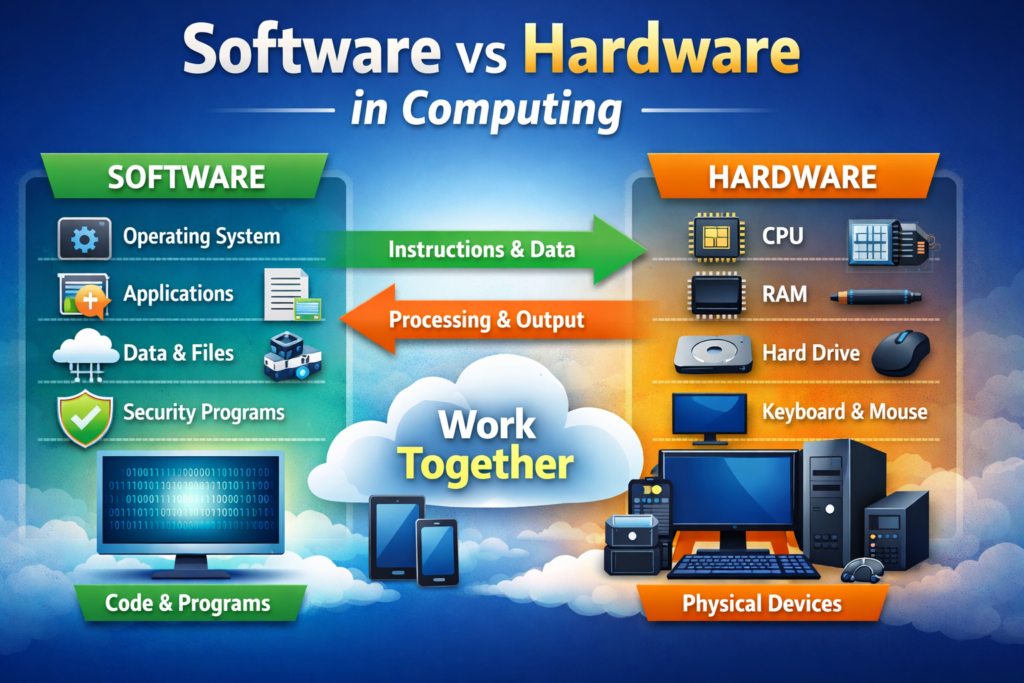
All electronic devices require both hardware and software to work correctly. Hardware is made up of the actual physical parts of the device (i.e., everything you can touch) while software consists of the code and instructions that provide directions for the use of the hardware.
It can be difficult at first to understand the difference between software and hardware for those just beginning to learn about computers, IT and similar technologies.
This is because hardware and software are intimately connected and depend on each other in order for each to function. A hardware piece (for example, a CPU) cannot execute any type of software unless the CPU has found a compatible operating system. Likewise, software that has been correctly written cannot be utilized by a hardware device if the hardware device does not also contain a compatible operating system.
This article provides easy-to-understand definitions of the difference between software and hardware.
By reading this article, you will gain a better understanding of how computers work, as well as the critical importance of both hardware and software for success in today’s technology–driven world.
What Is Hardware
Hardware refers to the physical components of a computer or electronic system.
It includes all tangible parts that create an arrangement and give it power to execute functions. Without hardware, computers or digital appliances cannot exist because they provide all structural elements and energy required to perform any kind of task with that device.
Typical examples of hardware are CPUs (processors), which function as a computer’s brain, and RAM (Random Access Memory), which keep applications operating smoothly.
Other types of hardware may include keyboards and mice, displays, printing devices, motherboards, GPUs and network interface cards. Smartphones also contain various kinds of hardware: displays, batteries, photographic lenses, amplifiers, and numerous integrated circuit components.
The primary function of hardware is to carry out the commands supplied by software. This data is processed, displayed to users and permitted interaction with the device via its physical interface (e.g., keyboard and mouse). As hardware ages, it may become obsolete or simply fail and require replacement or upgrade.
Learning about the hardware will assist the end user in making the appropriate choice when purchasing a digital product, upgrading, or maintaining existing hardware.
What Is Software
Software encompasses instructions, programs, and data that provide a computer or an electronic device with directions for completing particular tasks.
Unlike hardware—such as the parts of a computer—a piece of software has no physical presence; that is, it cannot be touched. Instead, it exists as binary code (0s and 1s) that runs on the device to make sure it operates properly and has usefulness for its users. Thus, without software, hardware would not know how to work.
Software may be classified into several different categories. The first category is operating systems (OS), which comprise System Software.
Examples of OS are Windows, macOS, Linux, and Android (in order of historical release). Operating Systems maintain and monitor basic device functions and interface – that is, they tell computers how to perform basic functions (e.g., running and managing hardware resources).
A second category of software is known as Application Software. This software consists of the individual computer programmes that perform the various tasks of an end user.
Examples of Application Software include Web Browsers, Microsoft Word (and Excel), Photoshop, etc., and the many hundreds of thousands of mobile apps available for download today. Examples of Utility Software include the various Antivirus/Anti-malware/Firewall software; Disk Cleanup Programs; and OS Optimization Programmes.
Software enables you to create documents, use the Internet, send and receive messages, play games, and perform countless additional contracting activities (e.g., wedding planning, travel bookings, genealogy searches, writing a book, etc.).
Unlike hardware, which cannot be easily changed as technology evolves, software has very few limitations with respect to the capability to be upgraded, changed, or replaced without interfering with the operation of the device.
As such, it comes to be imperative for any individual wishing to utilise the latest technology to learn about how software can impact their productivity.
Examples of Both
The best way to understand hardware and software is by looking at both in everyday life. Hardware refers to all of the physical, tangible parts of a computer or device, including the CPU (also known as the “processor”), mouse, keyboard, monitor, printer, hard drive or SSD (Solid State Drive), RAM (Random Access Memory), motherboard (the board that connects the processor, memory, and drives), and graphics card(s) (the cards that produce images on screen). For mobile devices like smartphones, the hardware includes the screen (touch screen), battery, camera(s), speakers, and all the internal chips which run the device.
Software is essentially any computer program or application that is executed on computer hardware to perform functions on the device.
Examples of software include operating systems such as Windows, macOS, Linux, Android and iOS and applications such as Google Chrome, Microsoft Word, Excel, Photoshop, VLC Media Player, Zoom, mobile apps, and video games for computers.
The two types of technology – hardware and software – complement one another as they are two parts of one device working together.
For example, when you use a keyboard to type a document into Word, you send input via a keyboard (hardware) to Microsoft Word (software) which processes the data and presents it in a format on a screen (hardware). Each interacts with the other to function, and is equally important for computing devices.
How They Work Together
The coordination of both hardware and software systems is key to the successful operation of a computer or electronic device.
Hardware is the foundation of the computer; it provides the physical resources required for functioning. On the other hand, software provides the instructions on how the hardware will be used and perform.
As neither hardware nor software can produce results independently, they work together in order to produce results. When a user opens an application (web browser), they use an input device (keyboard or mouse) to interact with the application and provide instructions for the CPU to follow.
Data is temporarily stored in RAM and saved to a storage device (hard drive or SSD). Results generated by the application are displayed on an output device (monitor or speakers).
An example of this would be when a user clicks on a file, the operating system (software) retrieves the file’s data from the hard drive or SSD (hardware), processes the data in the CPU, and then displays the result in a visual format on the monitor. Even basic actions of opening an application or clicking on a file rely on this constant interaction between hardware and software.
In conclusion, software gives directions to hardware regarding what to do, and hardware carries out the instructions provided by software.
The combination of hardware and software provides an efficient means for computers, smartphones, and other digital devices to perform daily functions reliably and effectively.
Here’s another article you may find useful:
How Smartphones Work Internally
What Is Cloud Computing Explained for Beginners
How Technology Is Improving Modern Life
Difference between Hardware and Software by

Conclusion
Computers and digital devices have basically two parts which are the software and hardware. While they are different from each other, they work together in an interdependent manner.
The hardware is the physical part of the computer or digital device and provides the structure and physical resources. The software provides the instructions to the hardware to allow it to operate. Alone on their own, neither hardware nor software performs well; however, when working together they provide users with a full computer or digital device that has the ability to perform various tasks.
By having the knowledge of the differences between software and hardware, users can make better educated choices when they purchase computers or digital devices and install software or troubleshoot issues.
Knowledge of the differences between software and hardware creates the groundwork for learning about computers, information technology, and modern technology.
In our modern-day world with the high extent of technology intertwined into everyone’s lives, being able to recognize how software and hardware work as a cohesive unit makes it easier and more effective for individuals to use their computers or digital devices on a daily basis.
Both hardware and software play equal roles in the effectiveness of a computer or digital device, and without their combined efforts modern computing would not be as it is today.



Pingback: 4 Ways Smartphones Work Internally | Ultimate Guide